Over a year ago, our design team was just two people: Christian and I, and while we worked as primary design owners for specific products, we were always collaborating on feature designs across these products. Our typical design process started with problem definition [Google Docs and Confluence] and then research + ideation [Zoom, Sheets, and Balsamiq] before we proceed to visual and experience design [Sketch and Invision].
As the design team grew to five members, we discovered that some approaches were no longer scalable. We needed a more collaborative tool to hand-off projects as well as for prototyping.
Hence, we made the decision to switch from Sketch to Figma. Figma checked all of our requirements on paper, but at the same time, it presented new challenges in communicating processes and navigating files created over time.
- Our Figma files are accessed by several teams in the company from product, to marketing, to engineering, all with their own requirements: As a front-end developer, I want to see approved high-fidelity designs. How can I navigate to the edge cases and prototypes directly?
- As a product designer, I want to see what design iterations are available. How can I access previous product design decisions?
- As a product manager, I want to see what status the design deliverables are being created by the team..
I came across more questions in my quest for answers:
- When is it proper to create a new Figma file?
- How should we handle the differentiation between design propositions and the version that shipped?
- Can we have a uniform naming strategy for files > pages > layers/elements?
Our journey was filled with triumphs, mistakes, and learnings. Through all of that, we found a solution that worked for us. Here is what we recommend for any growing team that is looking to scale its processes.
Project Cover Template
After attending a couple of design workshops, reading a tonne of Medium posts, and thinking generally about our use case and current process, it became apparent that an idea worth considering was that of a project cover template.
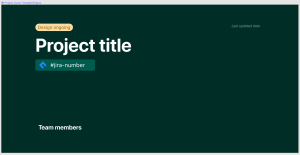
What is a project cover template?
A project cover template is a thumbnail with five key data points about any Figma file:
- Design status — ongoing, approved, handed-off, shipped

- Project title — feature name in a way that corresponds with a design or development ticket
- Jira number — a design and/or development ticket
- Team members — designers working on the file
- Key personnel — usually the primary product manager leading the feature/ticket
Setting up a project cover template will not only offer your team a quick overview, but will also make it easier to find the file you’re looking for in the grid view of a Figma project. A simple setup can save you and your team precious time that would otherwise be spent on looking for the right file.
File organization
Once you have set up your project cover template, it is also important to consider how to better manage your file organization within Figma’ here’s our recommendation:
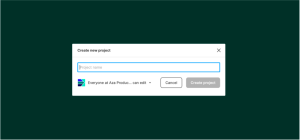
Projects ( Organization)
Create a new project for each product under the company’s portfolio. Product, in this case, ranges from an internal admin dashboard to front-facing web apps.
Pinned at the top of each project dashboard will be:
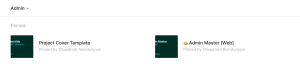
- Project Cover Template
- Project Master File [single source of truth] —this should sync with what exists on the production. Separating this master file from ticket files makes it easier to locate the latest designs.
This pinned structure also allows for easy access to the master file and ticket template, as both are always at the top of each project.
Files (⊆ Project)

Create a new file for each product feature or design ticket. Each file should start with the project cover template. As described earlier, this should only carry high-level information like the project name, team, and design status.
- The file naming convention typically follows this pattern [status] Feature name [platform] e.g Transaction Notifications [Email] to show that the file houses the transaction notifications feature for email and the status is ongoing.
- Create only one file per design feature in a way that aligns with your ticket system. Every ticket should only contain the relevant design
Pages (⊆ File)
Within each file, clearly label every page to show: Cover, Final Design, Edge cases, Archive e.t.c.
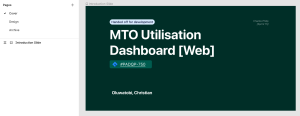
Here’s what each of these mean:
- Cover: where the project cover template lives
- Final Design: the approved designs that will go into production. After exploring options and vetting designs in internal design critique sessions, this is where we suggest your final recommendations should live, along with user flows, redlines, and such. It is also highly recommended that the designs here leverage your design system components.
- Edge Cases: On some complex projects, you can add an edge cases page that contains additional states and edge cases, such as: filled vs empty forms, empty states, error states, specific languages or geographies, different user tiers, logged-in status.
- Archive: Use the archive for any designs or pages that didn’t cut. The designs that do not make the cut for each exploration within a ticket file typically live here.
Layers (⊆ Page)
It is advisable here to name layers as much as possible since the final UI is what gets handed off to engineering. While there’s no strict naming convention for exportable assets, try to speak a common language and use consistent naming in design documentation.
What it looks like
This is a sample screenshot from our Admin project page in Figma:
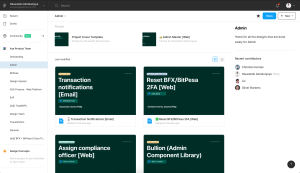
All of our process changes are open to adaptation, either because the process wasn’t necessary to begin with, or it needed to be streamlined further. With the project cover template, we are still learning and implementing small, constant iterations to further improve on this process we’ve started.
The pillar of good design is great communication. As Designers within a product environment, it is important to take some time to solve the UX issues you have with your team workflows. This exercise will help you create, align, and contribute your best work.
Written By:
Oluwatobi Akindunjoye
Product Designer, Lagos